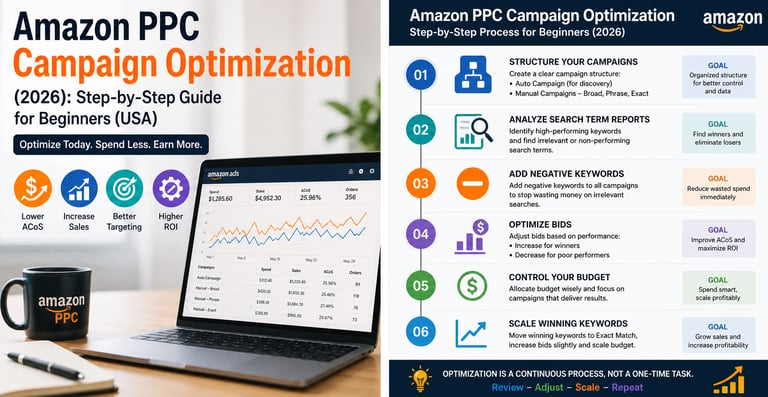
Amazon PPC Campaign Optimization (2026): Step-by-Step Guide for Beginners (USA)
If you’re running Amazon ads but not seeing profitable results, you’re not alone. Most beginners launch campaigns and then leave them untouched, hoping sales will magically improve. They don’t. In 2026, Amazon PPC optimization is no longer optional—it’s the difference between burning money and building a profitable brand. In this guide, you’ll learn a simple, step-by-step Amazon PPC optimization strategy designed specifically for beginners in the US market.
Smith Jacob
5/3/20264 min read


Why Most Optimization Advice Misses the Point
Typical Amazon advice focuses on tactics:
add more keywords
improve your bullets
run more ads
collect more reviews
These tactics can help.
But they often ignore the deeper issue.
A listing can be perfectly optimized technically… and still feel confusing to a buyer.
And confusion kills behavior signals.
Amazon doesn’t reward listings that look impressive.
It rewards listings that make buying feel simple.
The Three Moments That Shape Your Rankings
In a behavior engine, three moments matter most.
The first moment is the click.
When buyers see search results, they decide which product deserves attention.
Your image, price, and rating must instantly feel trustworthy.
If buyers skip your product, Amazon notices.
The second moment is the decision.
Once a buyer opens your listing, they quickly judge whether the product feels right.
If they hesitate, compare too many alternatives, or leave the page, Amazon records that behavior.
Listings that create clarity convert faster.
The third moment is the aftermath.
After buying, buyers might:
leave a review
reorder
return the product
Amazon studies these actions carefully.
Products that create satisfaction get rewarded.
Products that create regret slowly disappear.
The Daily Question Smart Sellers Ask
Once you understand Amazon as a behavior engine, your thinking changes.
Instead of asking:
“How can I sell more today?”
You start asking a better question:
“What behavior is my product creating?”
Are buyers clicking easily?
Are they deciding quickly?
Are they feeling confident?
This question becomes a daily habit.
And it’s one of the biggest differences between struggling sellers and successful ones.
The Shift That Changes Everything
Most sellers focus on selling harder.
But the real advantage comes from making buying easier.
When buying feels easy:
clicks increase
conversions increase
rankings increase
And the algorithm begins to trust your product.
That trust compounds over time.
Why This Insight Matters More in 2026
Amazon’s systems are becoming smarter every year.
Artificial intelligence and machine learning allow the platform to analyze buyer behavior with incredible precision.
This means the old strategies based purely on tactics are becoming weaker.
The sellers who succeed are the ones who understand the deeper layer.
They design their listings, pricing, and positioning around human behavior.
Not just technical optimization.
The Final Realization
Amazon doesn’t promote products simply because they exist.
It promotes products that fit the natural behavior of buyers.
Once you see the platform this way, things stop feeling random.
Instead of chasing the algorithm, you start aligning with it.
And that alignment is what separates short-term sellers from long-term winners.
AmazonBigStep.com exists to help sellers understand these deeper systems — not just the surface-level tactics.
Because once you understand how Amazon really works, every decision becomes clearer.
And the path to growth becomes much easier to see.
What Is Amazon PPC Optimization?
Amazon PPC optimization means continuously improving your ad campaigns to:
Reduce wasted spend
Increase conversions
Lower ACoS (Advertising Cost of Sales)
Improve ROI
👉 In simple terms:
Spend less → Earn more


🧠 Step-by-Step Amazon PPC Optimization Strategy
Follow this exact framework 👇
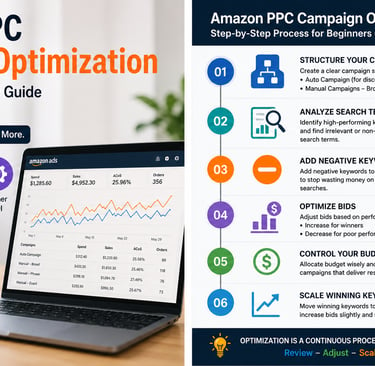
✅ Step 1: Clean Your Campaign Structure
If your campaigns are messy, optimization becomes impossible.
🎯 Ideal Structure:
Auto Campaign (for keyword discovery)
Manual Campaign:
Broad Match
Phrase Match
Exact Match
👉 Keep them separate.
💡 Pro Tip:
Start: Moderate bid
After 7 days: Adjust based on performance
✅ Step 5: Control Your Budget
Budget mismanagement kills campaigns.
🎯 Beginner Strategy:
Start with $10–$20/day per campaign
Don’t spread budget across too many campaigns
⚠️ Mistake:
Running 10 campaigns with $5 each
👉 Data becomes useless
⚠️ Why Most Amazon Sellers Fail at PPC
Before we fix things, understand the problem.
Most beginners:
Set campaigns and forget them
Don’t use negative keywords
Keep the same bids forever
Ignore data
Mix good and bad keywords in one campaign
👉 Result: High spend, low sales
written by amazon big step
✅ Step 3: Add Negative Keywords (CRITICAL)
This is the #1 optimization step most people ignore
❌ What happens without it:
You keep paying for useless clicks
🔧 Example:
Keyword:
👉 “cheap phone case”
If your product is premium → this is a bad match
✅ Add as:
Negative Phrase or Exact
💡 Result:
👉 Immediate cost reductions
This is where real optimization starts.
Go to:
👉 Advertising → Reports → Search Term Report
🔍 Look for:
Keywords that bring sales
Keywords that get clicks but no conversions
🎯 Your Action:
Move converting keywords → Exact Match campaign
Mark non-converting keywords → Negative keywords
✅ Step 2: Analyze Search Term Reports
This is where real optimization starts.
Go to:
👉 Advertising → Reports → Search Term Report
🔍 Look for:
Keywords that bring sales
Keywords that get clicks but no conversions
🎯 Your Action:
Move converting keywords → Exact Match campaign
Mark non-converting keywords → Negative keywords
✅ Step 6: Focus on ACoS (But Don’t Obsess)
📊 What is ACoS?
ACoS = Ad Spend ÷ Sales
🎯 Ideal Range:
Break-even: 25–35%
Profit: Below 25%
💡 Important:
New campaigns = higher ACoS (normal)
👉 Optimize over time
Expertise
Your partner for Amazon growth and success.
Services
Insights
connect@amazonbigstep.com
+1 (859)4182348
© 2025. All rights reserved.